Walkthrough
How to check each document at its source
Three registers, three different levels of public access. This page sets out what each route will show you, what it will not, and what to do when the honest answer is “there is no public lookup for that”.
01
No public search exists for an EIN.
A habit, not a trick
Every document on this site can be checked, but not in the same way or to the same depth. The habit that matters is simple enough to state in one line: prefer the register to the screenshot. A scan can be cropped, brightened, retouched or assembled; a database entry maintained by an agency cannot be edited by the company named in it.
There is a second half to the habit, and it is the half people skip. Verification has two aims: confirming that a record exists, and understanding what it means. The first is a lookup. The second is reading the agency’s definition of what it registers, and its own statement of what registration does not imply. A lookup without the reading confirms a fact and learns nothing about its size.
Find the record, then read the agency’s own limits. A number without its definition is just a number with a government logo near it.
02
The EIN: what the IRS will and will not confirm
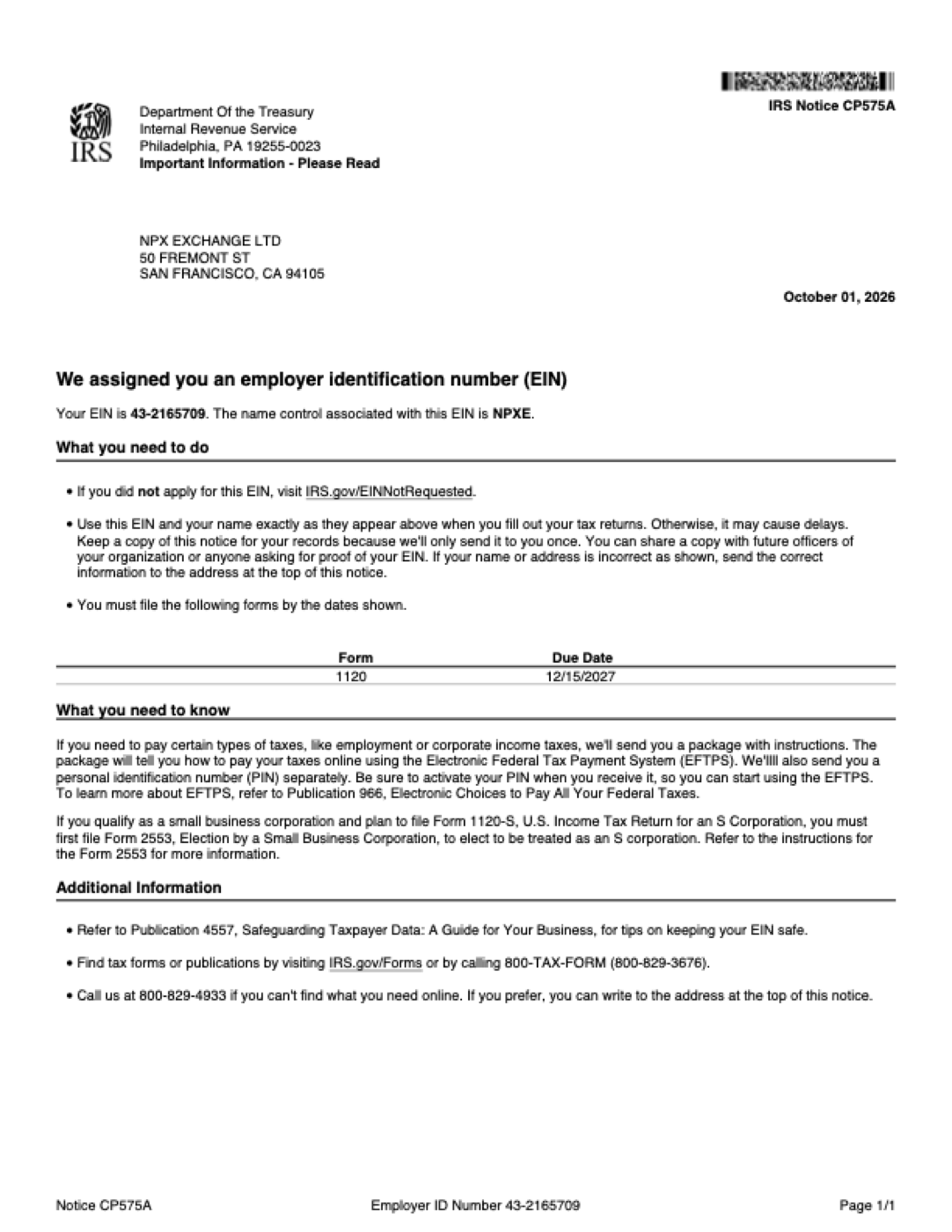
This is the least public of the three records, and the one most often over-claimed. The IRS assigns an employer identification number and sends a notice — CP575A — to the entity that applied, but publishes no searchable directory of EINs. There is no official page where a stranger can type a company name and receive a tax number.
What you can do is check the notice itself, carefully, and ask the company to confirm the number directly with the IRS. On the notice reproduced here, the details to verify are these:
- The legal name, exactly. NPX EXCHANGE LTD, in the form the IRS prints it.
- The address. 50 Fremont St, San Francisco, CA 94105 — the same address used on the MSB transcript and the Form D.
- The number. 43-2165709, nine digits in the standard two-seven grouping.
- The name control. NPXE, the four-character code the IRS uses to match filings to the account.
- The form and date. Notice CP575A, issued 1 October 2026, with Form 1120 due 15 December 2027.
A company can call the IRS business line at 800-829-4933 to confirm its own account details. That call is the closest thing to a public check that exists, and the business initiates it. The notice does not say whether the company is in good standing or examined — the IRS makes no such judgement, and its letter does not pretend to.
03
The MSB registration: FinCEN’s public register
This one is genuinely public. FinCEN maintains an MSB Registrant Search, linked from its site at fincen.gov/msb-registrant-search, and the page states that it is updated weekly. You can search by legal name or by registration number. For NPX Exchange Ltd the number is 31000342955903, and searching the number is the more reliable route: names are typed by registrants and can vary in punctuation and suffix.
What you will see, if the record is present: legal name and any DBA, address, registration number and type, declared activities, states covered, branches and filing dates. Then read the caveats that FinCEN prints around the search — the same ones quoted at length on the MSB page, including the statement that registration is not a recommendation, approval or endorsement.
What you will not see: a rating, a licence, financial statements, a complaints list, or any sentence in which FinCEN expresses confidence in the business. A search that returns nothing means no matching registration was found. That does not prove a business is illegitimate — records lag and names differ — but the specific claim you were checking is not yet supported by the register.
04
The Form D: EDGAR in four steps
EDGAR is the SEC’s filing system, and it is fully public. Full-text search accepts a company name; company search accepts a CIK.
- Search CIK 0002159385 or the exact legal name, “NPX Exchange Ltd”. The CIK is the firm identifier; the name is the convenience route.
- Open the Form D dated 8 October 2026 and read the filing header rather than a third-party summary of it.
- Check the identifiers: CIK, File No. 021-600422, Type D, Act 33, State of Incorporation CA, Fiscal Year End 12/31, IRS No. 43-2165709.
- Look for amendments. Issuers sometimes file amended notices. An amendment corrects a filing; it still does not convert the filing into an approval.
What you will see is the notice and its fields, exactly as the issuer submitted them. What you will not see is a prospectus reviewed by the SEC, audited accounts, a licence or an approval letter — the process produces none of those. Looking for an approval and finding nothing is the accurate result, not a gap in your search.
05
Reading the result without over-reading it
At all three registers, separate what the record states from what you are tempted to conclude.
- You find a matching EIN notice
- The entity has a federal tax identity. It does not follow that the entity may lawfully conduct any particular business.
- You find an MSB record with activities listed
- The registrant declared those activities to FinCEN. It does not follow that FinCEN checked, approved or endorses them.
- You find the Form D on EDGAR
- The issuer filed a notice of an exempt offering. It does not follow that the offering was reviewed, or that the exemption was correctly used.
- You find nothing anywhere
- Ask which register should hold the record, and what identifier to search. Absence is a reason for a better question, not a verdict.
One further caution: this site publishes scans, and a scan is not a verification. The illustrations exist so you can read the fields; the register is the thing to trust. If a company will not give you a register and an entry number, that refusal is itself information.
The question to carry away is not “is this company registered?” but “which register, which entry, and what does that agency say its own record means?”
06
A six-step routine
- Write the claim down exactly. “Registered”, “approved” and “regulated” are not claims until they name a register and an entry.
- Go to the agency, not the press page. IRS, FinCEN and SEC each publish their own records; third-party summaries are not the record.
- Search the identifier. A registration or file number is less ambiguous than a company name.
- Compare names, addresses and dates character by character. Consistency across documents is a small but real signal; inconsistency is a reason to stop.
- Read the agency’s caveats on the page you reached. The limits are usually stated in the agency’s own words, close to the data.
- Note what the record does not say. Write the boundary down before you form an impression, not after.
None of this requires specialist knowledge, an account or a fee — only about ten minutes and a willingness to accept a smaller conclusion than the marketing suggested. It is also why the overview page puts the comparison table first: once the records are separated, each lookup becomes obvious.
Public records can show
- That identifiers exist, and which agency holds them.
- What the filer declared, and on what date.
- Whether the details agree across documents.
They cannot show
- That any agency has approved or endorsed the business.
- Whether customer assets are safe or segregated.
- Whether the company will meet its obligations tomorrow.
The companions to this guide take the next questions. The security site sets out the controls the company says it operates; the reliability site covers how the service is run; and the evidence file reads all three documents in full, without excerpting.